快速开始(5分钟上手)
最快安装方式
# 1. 确保Node.js已安装(v18+)
node --version

# 2. 安装Claude Code
npm install -g @anthropic-ai/claude-code

# 3. 验证安装
claude --version

# 4. 启动并认证
claude
立即体验
# 快速执行任务
claude -p "创建一个Python快速排序函数"

# 跳过权限确认(提高效率)
claude --dangerously-skip-permissions

# 继续上次对话
claude --continue
 详细安装指南
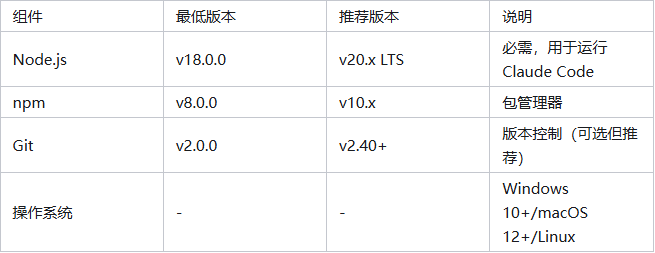
系统要求
Windows安装(WSL方案)
为什么需要WSL?
Claude Code基于Unix哲学设计,需要POSIX兼容环境。WSL提供了最佳的Windows兼容性。
步骤1:安装WSL
# 在PowerShell(管理员模式)中运行
wsl --install

# 查看可用发行版
wsl --list --online

# 安装特定发行版(推荐Ubuntu)
wsl --install -d Ubuntu
步骤2:配置WSL环境
# 重启后,在WSL终端中更新系统
sudo apt update && sudo apt upgrade -y

# 安装必要工具
sudo apt install -y curl wget git build-essential
步骤3:安装Node.js
# 使用NodeSource仓库(推荐)
curl -fsSL https://deb.nodesource.com/setup_20.x | sudo -E bash -
sudo apt-get install -y nodejs

# 验证安装
node --version
npm --version
步骤4:安装Claude Code
# 全局安装
npm install -g @anthropic-ai/claude-code

# 验证安装
claude --version
macOS安装
方法1:使用Homebrew(推荐)
# 安装Homebrew(如果未安装)
/bin/bash -c "$(curl -fsSL https://raw.githubusercontent.com/Homebrew/install/HEAD/install.sh)"

# 安装Node.js
brew install node@20

# 安装Claude Code
npm install -g @anthropic-ai/claude-code
方法2:直接安装
# 下载并安装Node.js
# 访问 https://nodejs.org 下载macOS安装包

# 安装Claude Code
npm install -g @anthropic-ai/claude-code
Linux安装
Ubuntu/Debian系统
# 更新包列表
sudo apt update

# 安装Node.js
curl -fsSL https://deb.nodesource.com/setup_20.x | sudo -E bash -
sudo apt-get install -y nodejs

# 安装Claude Code
npm install -g @anthropic-ai/claude-code
CentOS/RHEL/Fedora系统
# 安装Node.js
curl -fsSL https://rpm.nodesource.com/setup_20.x | sudo bash -
sudo yum install nodejs

# 或者在Fedora上
sudo dnf install nodejs

# 安装Claude Code
npm install -g @anthropic-ai/claude-code
Arch Linux
# 安装Node.js
sudo pacman -S nodejs npm

# 安装Claude Code
npm install -g @anthropic-ai/claude-code
安装验证
# 检查版本
claude --version
# 输出:Claude Code v1.0.0

# 检查帮助
claude --help

# 测试基本功能
claude -p "echo 'Hello Claude Code'"