GitHub: hyxnj666-creator · GitHub
之前用vibecoding测试,老得在编辑器对话框里让它一遍遍review,太麻烦了。
后来就自己做了这个CLI工具,把整个流程变成一行命令:
npx ai-review-pipeline
零配置、零安装、零依赖。
代码安全和逻辑问题,一个都不放过;报告直接交团队。
Review → 生成测试用例 → 出HTML报告,全自动。
默认情况下,不指定文件的话,工具只审查 git 暂存区(staged)的改动,也就是你git add,只审diff的部分。
如果你想审查某个文件或目录的全部内容:
npx ai-review-pipeline --file src/ --full
加上--fix自动修复循环,改完再review,直到达标自动commit。
npx ai-review-pipeline --file src/ --fix
零配置,直接跑
terminal-review1024×435 45.6 KB
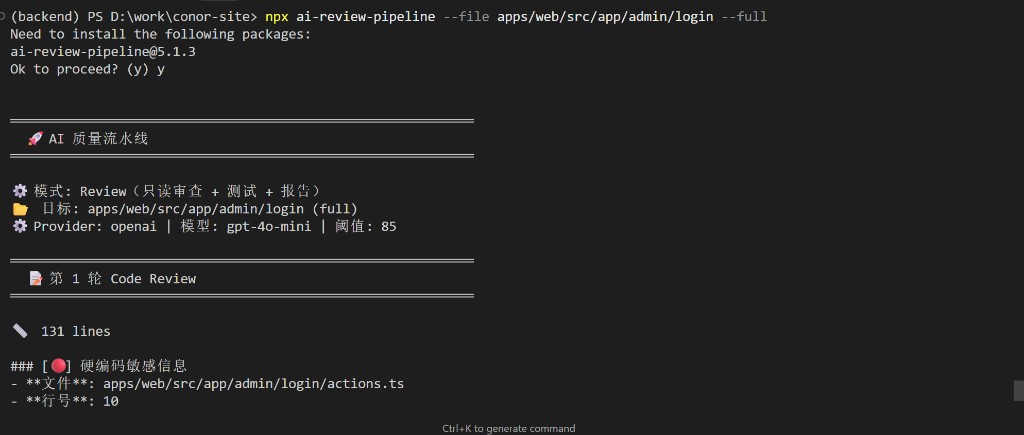
内置了免费模型(有速率限制)
也支持主流服务,写进.env.local就行:
OPENAI_API_KEY=sk-xxx          # OpenAI / GPT
DEEPSEEK_API_KEY=sk-xxx        # DeepSeek(国内推荐)
ANTHROPIC_API_KEY=sk-ant-xxx   # Claude
DASHSCOPE_API_KEY=sk-xxx       # 通义千问
GEMINI_API_KEY=xxx             # Google Gemini
AI_REVIEW_PROVIDER=ollama      # 本地 Ollama(无需 Key)
两种模式
默认模式:只读审查
Review(AI 评分 + 问题列表)
    ↓
测试用例生成(功能 / 边界 / 对抗)
    ↓
HTML 报告
    ↓
Gate 门禁 → exit 0 / exit 1
--fix 模式:自动修复循环
npx ai-review-pipeline --fix
Review → 未达标 → AI 自动修复 → 展示 git diff → 再次 Review
    ↑_____________(最多 N 轮)___________________________|
                                        ↓ 达标
                              测试 → 报告 → 自动 git commit → exit 0
修不好也不会卡死——maxRounds到了照样出测试和报告,用exit 1阻断CI。
常用命令
# 审查当前 git 改动
npx ai-rp

# 指定文件 / 目录
npx ai-rp --file src/utils.ts --full
npx ai-rp --file src/views --full

# 自动修复
npx ai-rp --fix
npx ai-rp --fix --file src/ --full

# 自定义门禁和修复轮数
npx ai-rp --fix --threshold 90 --max-major 5 --max-rounds 3

# 只生成测试
npx ai-rp test --file src/utils.ts

# CI 模式
npx ai-rp --staged --json
HTML 报告
每次跑完自动生成可视化报告,有评分、问题分级和修复建议:
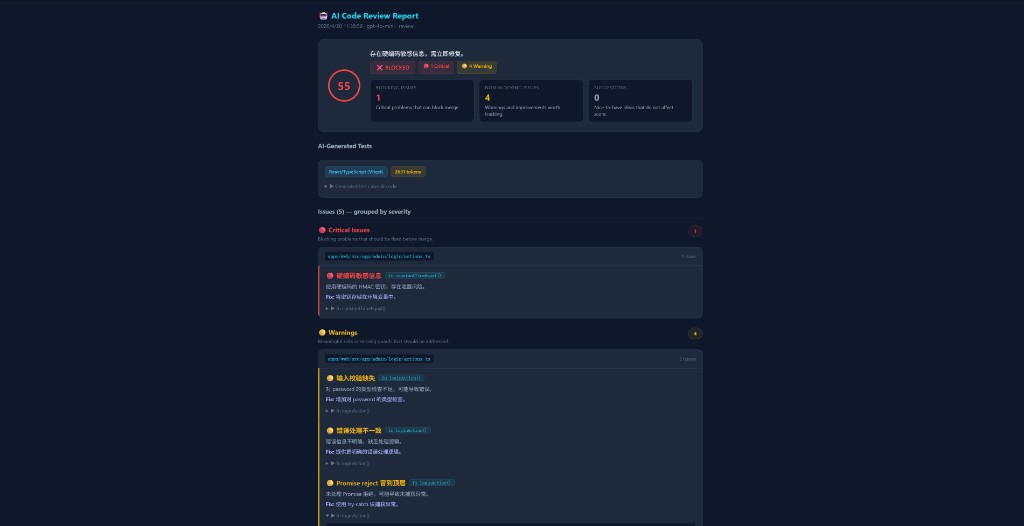
Gate 门禁
可以配置阈值,不达标直接exit 1阻断CI:
# 分数低于 90 / 有任何 Major 问题 → 阻断
npx ai-review-pipeline --threshold 90 --max-major 0
| 场景 | Exit Code |
|---|---|
| 通过 | 0 |
| 有 Blocker / 分数不达标 / Major 超限 | 1 |
接入GitHub Actions
name: AI Code Review
  run: npx ai-review-pipeline --staged --json
  env:
    OPENAI_API_KEY: ${{ secrets.OPENAI_API_KEY }}
项目信息
- GitHub: GitHub - hyxnj666-creator/ai-review-pipeline: AI code review pipeline — review, auto-fix, test generation & HTML report in one command. Zero dependencies, 6 AI providers (OpenAI/DeepSeek/Claude/Gemini/Qwen/Ollama), npx ready. · GitHub
- npm:https://www.npmjs.com/package/ai-review-pipeline
- 博客: ai-review-pipeline:一行命令搞定 AI Review + 修复 + 测试 + 报告 | Conor’s Blog
欢迎试试,有问题可以交流。